ERP Implementation Challenges and Issues: Migrate Confidently 

Updated: May 19, 2026


ERP implementation challenges are rarely just technical. Most companies focus on selecting the right system, but reporting is where implementations break down: dashboards go dark, historical data becomes inaccessible, and Month-over-Month comparisons fail. This article identifies three core challenges, including direct ERP-to-report dependencies, Excel-based processes that cannot span two systems, and missing historical data structure, then sets out the solution: a modern data platform that centralises data from both old and new ERPs throughout the transition. Six practical steps are covered, from assessing reporting dependencies early through to running a parallel testing environment before go-live.

Implementing an ERP is like giving your business a new heart — it’s a critical change that keeps everything running. Most companies focus on selecting the right ERP and managing the transition, but reporting often gets overlooked. The result? Broken dashboards, missing data from the past ERP and uninformed decision-making.

In this article, I explain how to tackle ERP implementation challenges and ensure reporting stays accurate and accessible during and after the transition.

What are the challenges of implementing an ERP system?

Most reports are tightly integrated with the ERP. When the ERP changes, reporting can break. Here’s why:

1. If reports pulled directly from the ERP, switching systems creates data gaps and downtime.
2. Businesses relying on Excel-based reports struggle to keep up when data spans two ERPs.
3. Without a structured approach, Month-over-Month (MoM) and Year-over-Year (YoY) analysis becomes difficult.

The key challenges in ERP integration compound when businesses have not implemented a data layer sitting outside the ERP itself — for a structured starting point, our ERP data migration services outline how to approach this.

How to migrate system without losing access to reports?

A modern data platform can help you avoid ERP implementation challenges. It’s data repository where all your data centralised. With a modern data platform, the ERP integration is:

Uninterrupted, with access to old and new data.

A data platform ingests data from both systems for smooth reporting.

Consistent in KPIs, keeping business logic intact.

No need to rebuild reports from scratch.

Automated with less manual work.

A modern data infrastructure automates data integration to prevent time-consuming fixes.

A modern data platform can help you avoid ERP implementation challenges. It’s data repository where all your data centralised. With a modern data platform, the ERP integration is: 

Uninterrupted, with access to old and new data.

A data platform ingests data from both systems for smooth reporting. 

Consistent in KPIs, keeping business logic intact. 

No need to rebuild reports from scratch. 

Automated with less manual work. 

A modern data infrastructure automates data integration to prevent time-consuming fixes. 

What are the steps you should take to make it happen?
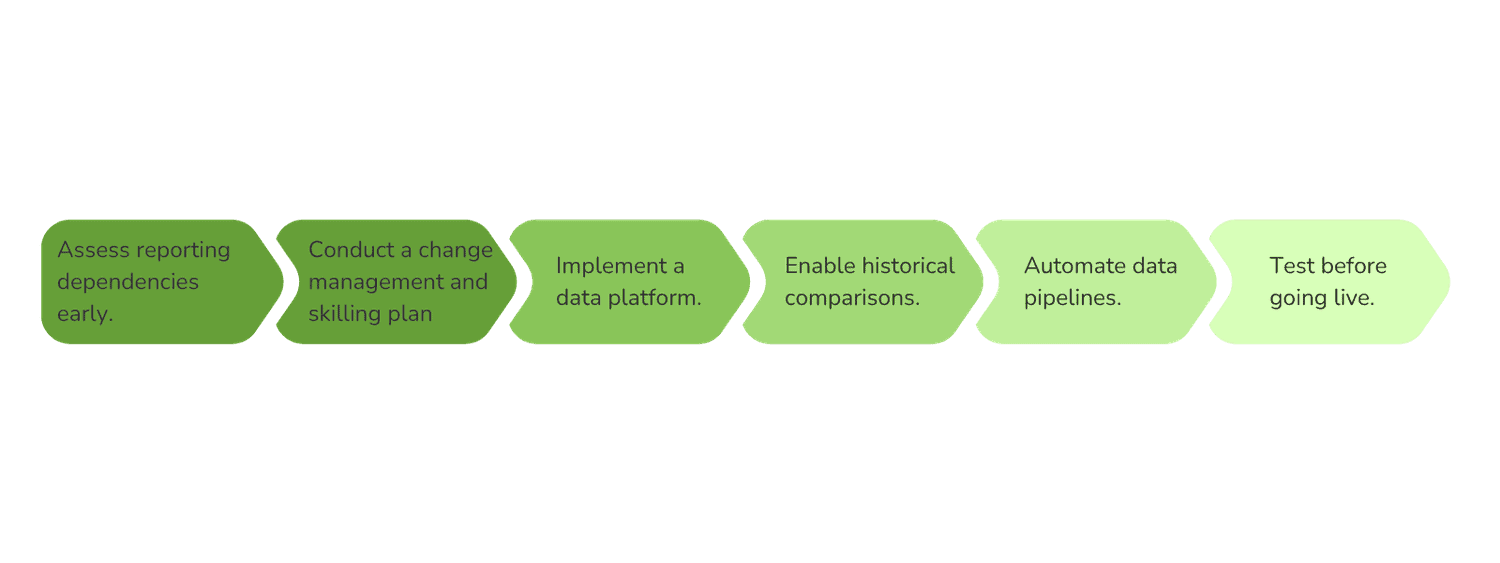
The infographic illustrates step to take to avoid ERP implementation challenges.
Assess reporting dependencies early

Before starting an ERP migration, it’s crucial to audit your current reporting estate and understand which reports are tied to the existing ERP. Many businesses unknowingly hard-code their reporting structures directly into the ERP, meaning that when the ERP changes, reporting breaks.

  • Identify the mission-critical reports that decision-makers rely on daily.
  • Determine which reports are ERP-dependent and which pull data from multiple sources.
  • Analyse historical data needs — will your new ERP structure support month-over-month (MoM) and year-over-year (YoY) comparisons?

By assessing dependencies early, businesses can plan for a smoother transition and prevent reporting disruptions.

Conduct a change management and skilling plan

ERP migrations are not just technical changes, they impact employees, workflows, and decision-making processes. A common ERP migration mistake companies make is focusing only on system implementation while neglecting the people using the data.

  • Conduct training sessions for employees on how the new ERP will impact reporting.
  • Create a change management plan to guide teams through the transition.
  • Ensure data analysts and business users understand how reporting structures will evolve.

Without proper training and communication, employees may struggle to trust the new system, leading to confusion, inefficiencies, and adoption challenges.

Implement a data platform for continuity

To prevent ERP dependency from disrupting reporting, companies should implement a centralised data platform that acts as a single source of truth.

  • Extract and store historical data from the legacy ERP before the transition.
  • Establish a data pipeline that ingests data from both the old and new ERPs.
  • Use cloud-based storage to enable scalability and future-proof analytics.

This approach ensures that reporting is not tied to a single system, making it more resilient to future changes.

Enable historical comparisons for better insights

One of the biggest pitfalls of ERP migrations is the loss of historical data needed for trend analysis and performance benchmarking. If companies don’t structure their data correctly, they may struggle to compare past and present metrics accurately.

  • Store and map historical data so that reports remain consistent.
  • Ensure that key business metrics remain unchanged, even if the ERP’s structure evolves.
  • Use a data transformation layer to standardise data across both ERPs.

Without proper mapping, businesses could experience inconsistent KPIs, leading to misaligned reports and incorrect strategic decisions.

A data readiness assessment before migration starts helps surface ERP data migration challenges before they become costly to fix.

Automate data pipelines to reduce manual effort

Relying on manual data extraction, such as exporting reports to Excel, is not sustainable, especially during an ERP transition where data complexity increases. Automating data pipelines ensures that data flows seamlessly without human intervention.

  • Set up automated ETL (Extract, Transform, Load) processes to pull data from multiple systems.
  • Reduce dependency on manual reconciliations, which can become more complex with new ERP structures.
  • Use real-time or scheduled data refreshes to ensure reports are always up to date.

By automating data flows, companies can reduce reporting downtime, improve accuracy, and free up employees to focus on analysis rather than data wrangling.

Test before going live to prevent disruptions

Even with a well-planned migration, unforeseen challenges can arise. Before fully switching to the new ERP, companies should test their data platform and reporting environment to catch issues before they impact business operations.

  • Run a parallel reporting environment, comparing data from both the old and new ERPs.
  • Validate critical reports to ensure they match historical trends.
  • Conduct stress tests and scenario analysis to check for inconsistencies.

Testing helps businesses identify gaps and fix errors early, ensuring a smooth transition without data inconsistencies, reporting delays, or decision-making blind spots.


So, what should you consider before ERP implementation to avoid reporting challenges?

ERP migration will limit visibility of the past data, making it impossible to create due to reporting failures adds unnecessary risk. A data platform keeps reporting stable, maintains historical insights, and prevents chaos. If your company is planning an ERP migration, let’s talk about how to safeguard your reporting from day one.

Move to a modern ERP without losing access to the data from the old one

overlay background

Frequently Asked Questions

What are the common challenges of ERP implementation?

The most common ERP implementation challenges are reporting-related, not just technical. When an ERP changes, any reports built directly on that system break, creating data gaps and downtime. Businesses relying on Excel-based reporting struggle to maintain continuity when data spans two systems simultaneously. Without a structured approach, Month-over-Month and Year-over-Year comparisons become impossible. At a process level, failing to audit reporting dependencies before migration, skipping parallel testing, and neglecting change management are the most consistent causes of disruption. Addressing these challenges requires implementing a data platform that sits outside the ERP and acts as a single source of truth across the transition.

What is the biggest challenge with ERP systems?
How do you overcome ERP implementation challenges?
What are the key challenges in ERP integration?
How do you avoid data loss during an ERP migration?
Keith Cutajar, COO

Author

Keith Cutajar is Chief Operating Officer at Eunoia, bringing over seven years of hands-on experience leading data and AI transformation projects, including ERP implementation and data migration programmes. He has overseen end-to-end implementations across cloud platforms like Azure and Databricks, with a focus on turning complex data systems into real business outcomes. Keith holds multiple certifications in Microsoft Fabric, Azure, and Databricks, and has led cross-functional teams through ERP transitions, platform migrations, AI deployments, and analytics modernisation initiatives. His track record positions him as a trusted voice for organisations navigating ERP implementation challenges at scale.