Waiting a week for a report is not normal, and with a self-service data analytics platform, it doesn’t have to be. This article explains how tools like Power BI, Tableau, and Looker enable non-technical employees to generate and access data insights independently, without relying on IT teams. Eunoia has implemented self-service analytics for clients including Hudson, NetRefer, and Atlas Insurance — delivering faster decision-making, reduced IT workloads, and improved operational efficiency across the board. The article also previews the next evolution: AI-powered chat agents that allow users to query data in natural language, bypassing dashboards entirely.
Introduction
I remember a conversation I had a year or two ago at ICE. I was talking to a business leader who asked me a simple yet telling question: “is it normal that I ask for some report/information, and I have to wait 1 week?”. I could sense his frustration, and I knew it was a situation many others were facing too. No, it’s not okay.
With self-service data analytics, reports can be generated automatically, in a matter of seconds, and accessed by any non-technical user. The role of self-service analytics is to empower users, regardless of their technical background, with intuitive and easy to navigate dashboard.
Self-Service Data Analytics Tools
 Self-service analytics removes the gap between data and business users. Tools like Power BI, Tableau, and Looker provide easy-to-use platforms that allow employees — without technical backgrounds — to generate reports and analyse key metrics. This improves efficiency and nurtures a data-driven mindset across the organisation. Modern data infrastructure, typically, enable this by offering robust, integrated solutions that centralise data access and streamline analytics processes.
Steps to Implementation
To get self-service data analytics right, follow these steps:
- Select the Right Platform – Pick the tools that meet your needs, like Power BI or Tableau.
- Design User-Friendly Dashboards – Create accessible interfaces that deliver key insights instantly.
- Train Employees – Ensure your team knows how to make the most of these tools.
Success Stories
We implemented self-service analytics for several companies, like Hudson, NetRefer, and Atlas Insurance. The integration, as reported by the companies, led them to faster decision-making, reduced IT workloads, and improved efficiency.
Netrefer noted that the implementation of self-service analytics made insights accessible to non-technical users, which allows them to optimise their marketing strategy effectively.
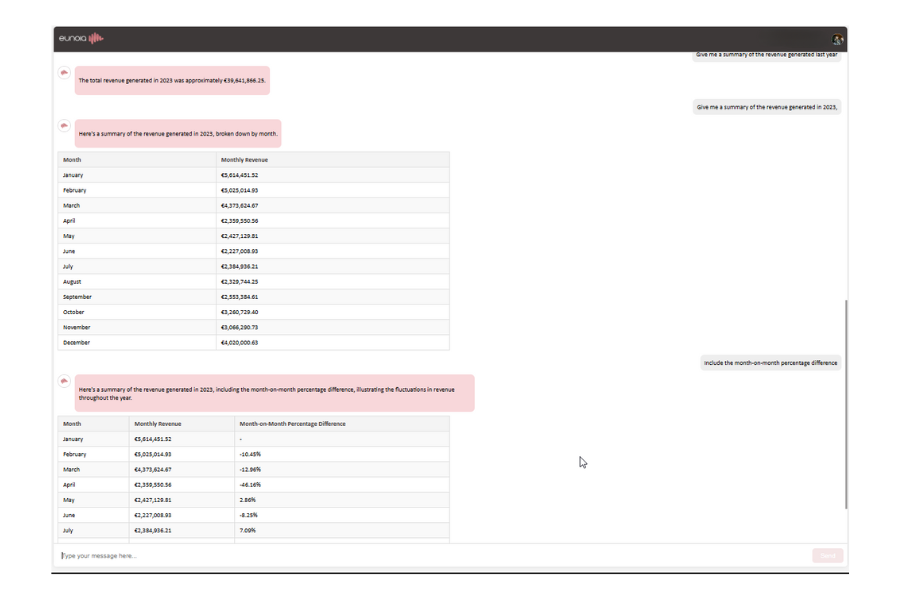
The next phase in self-service analytics is AI-powered chat agents. These tools interact directly with data, allowing users to ask questions and generate reports through natural language queries – no dashboard experience required. See the AI-powered chat agent in action at the screenshot of Eunoia model below.
Transforming Business with Self-Service Analytics
Self-service analytics is essential for thriving in a world where data volumes are growing exponentially. By empowering employees to analyse and interpret data independently, companies can drive innovation and make smarter strategic decisions.